pynq-rpi-ph-adapter
pynq-rpi-ph-adapter is an adapter board that routes all Raspberry and Arduino GPIOs of the Pynq Z2 board to side connectors that are compatible with boards such as adc-board-six-channels, digital-isolator-2t6r, and digital-isolator-6t2r. In total, 48 GPIOs are made available in six different connectors (8 GPIOs per connector).
Board and pinout
A partially populated board mounted on a Pynq Z2 board is shown in Fig. 41. The board’s pinout is shown in Fig. 42. The mapping between the IOs, equivalent Raspberry/Arduino pins and the actual FPGA pins are shown in Table Pin mapping.
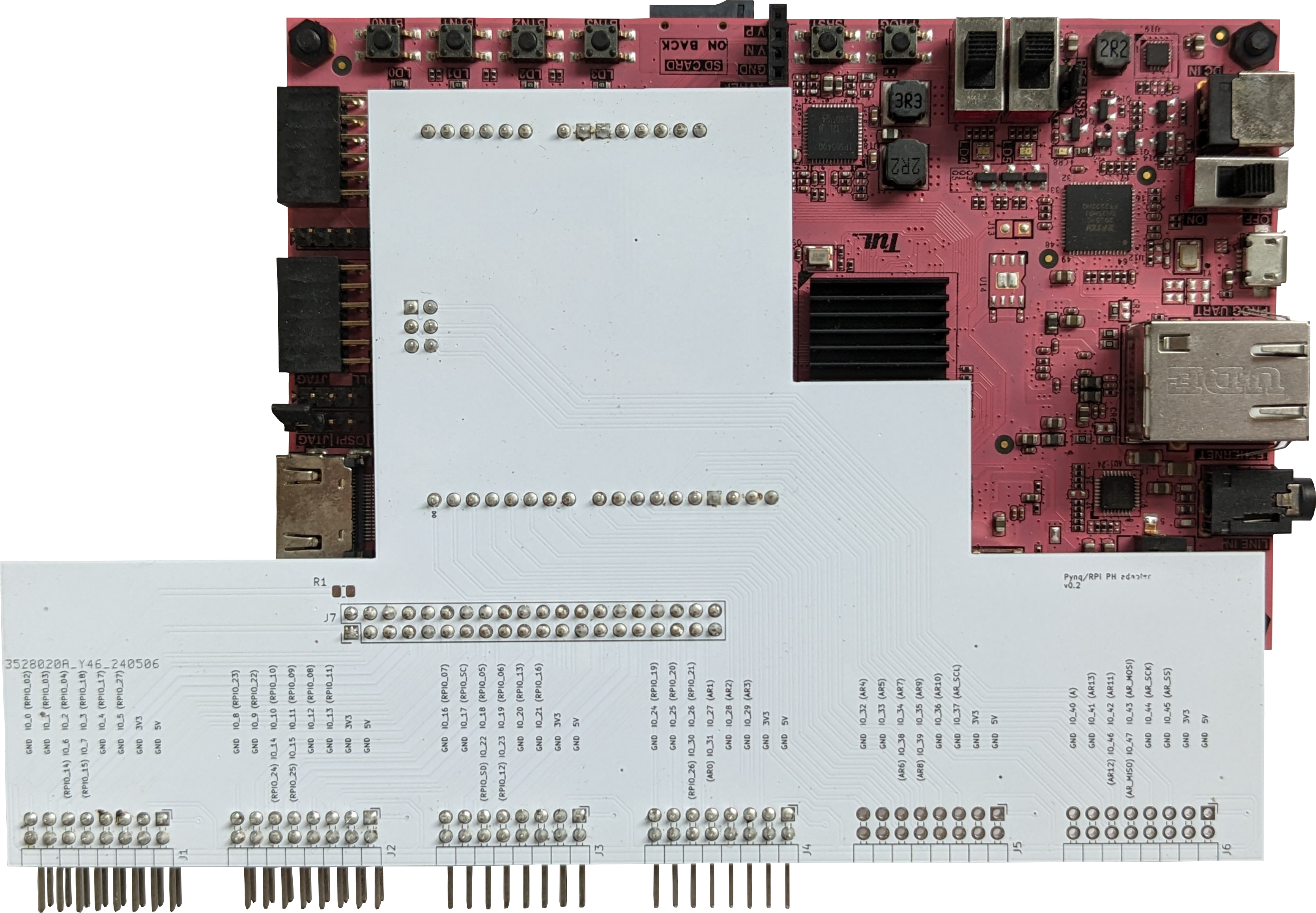
Fig. 41 Adapter board mounted on a Pynq Z2.
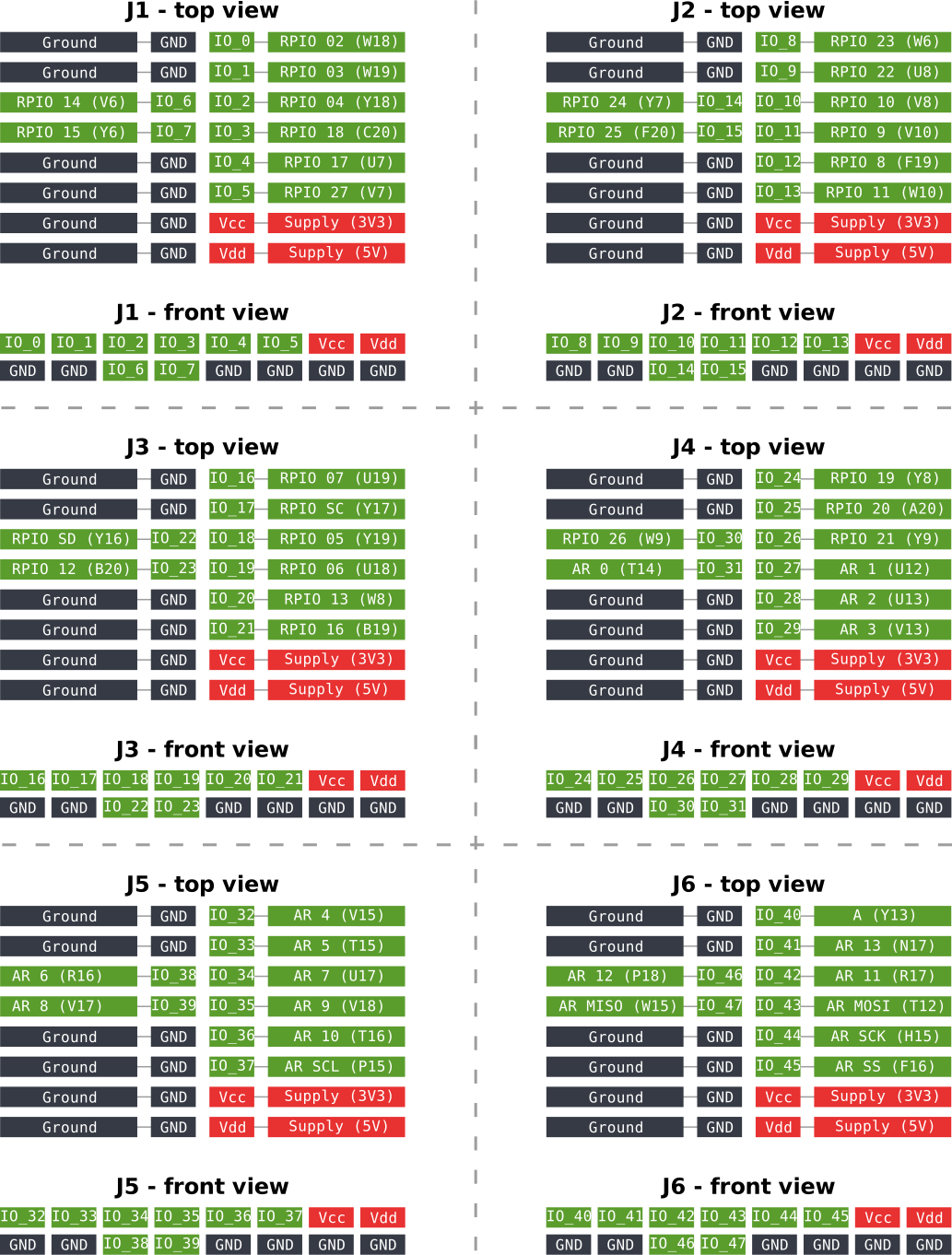
Fig. 42 Board pinout.
Adapter |
Pynq |
Zynq |
Adapter |
Pynq |
Zynq |
|---|---|---|---|---|---|
IO 0 |
RPIO 02 |
W18 |
IO 24 |
RPIO 19 |
Y8 |
IO 1 |
RPIO 03 |
W19 |
IO 25 |
RPIO 20 |
A20 |
IO 2 |
RPIO 04 |
Y18 |
IO 26 |
RPIO 21 |
Y9 |
IO 3 |
RPIO 18 |
C20 |
IO 27 |
AR1 |
U12 |
IO 4 |
RPIO 17 |
U7 |
IO 28 |
AR2 |
U13 |
IO 5 |
RPIO 27 |
V7 |
IO 29 |
AR3 |
V13 |
IO 6 |
RPIO 14 |
V6 |
IO 30 |
RPIO 26 |
W9 |
IO 7 |
RPIO 15 |
Y6 |
IO 31 |
AR0 |
T14 |
IO 8 |
RPIO 23 |
W6 |
IO 32 |
AR4 |
V15 |
IO 9 |
RPIO 22 |
U8 |
IO 33 |
AR5 |
T15 |
IO 10 |
RPIO 10 |
V8 |
IO 34 |
AR7 |
U17 |
IO 11 |
RPIO 9 |
V10 |
IO 35 |
AR9 |
V18 |
IO 12 |
RPIO 8 |
F19 |
IO 36 |
AR10 |
T16 |
IO 13 |
RPIO 11 |
W10 |
IO 37 |
AR SCL |
P15 |
IO 14 |
RPIO 24 |
Y7 |
IO 38 |
AR6 |
R16 |
IO 15 |
RPIO 25 |
F20 |
IO 39 |
AR8 |
V17 |
IO 16 |
RPIO 07 |
U19 |
IO 40 |
A |
Y13 |
IO 17 |
RPIO SC |
Y17 |
IO 41 |
AR13 |
N17 |
IO 18 |
RPIO 05 |
Y19 |
IO 42 |
AR11 |
R17 |
IO 19 |
RPIO 06 |
U18 |
IO 43 |
AR MOSI |
T12 |
IO 20 |
RPIO 13 |
W8 |
IO 44 |
AR SCK |
H15 |
IO 21 |
RPIO 16 |
B19 |
IO 45 |
AR SS |
F16 |
IO 22 |
RPIO SD |
Y16 |
IO 46 |
AR12 |
P18 |
IO 23 |
RPIO 12 |
B20 |
IO 47 |
AR MISO |
W15 |
Compatible boards
Some boards that compatible with the pynq-rpi-ph-adapter are:
Connecting compatible boards
There are two possibilities when using the pynq-rpi-ph-adapter with compatible boards. The first option is to solder pin headers on the top of the board, and simply attach a compatible board. The second option is to attach compatible boards via ribbon cables. In this case, the headers must be soldered on the bottom of the adapter board. This is because the ribbon cable matches the pins on both connectors one-to-one, but we need them to be mirrored. For an example of connection via ribbon cables, see Application example.
Notes
Both 3V3 and 5V are routed to the side connectors (see pinout in Fig. 42). The 3V3 rail is always routed to the connector; however, the 5V rail can be routed to or isolated from the connectors depending on a jumper resistor (see resistor R1 on the schematics of the board).
Application example
Fig. 43 shows the pynq-rpi-ph-adapter board connecting the Pynq board with an experimental dc-dc converter. Compatible boards are attached to the pynq-rpi-ph-adapter board via ribbon cables. For this reason, the male headers were soldered on the bottom of the pynq-rpi-ph-adapter board.
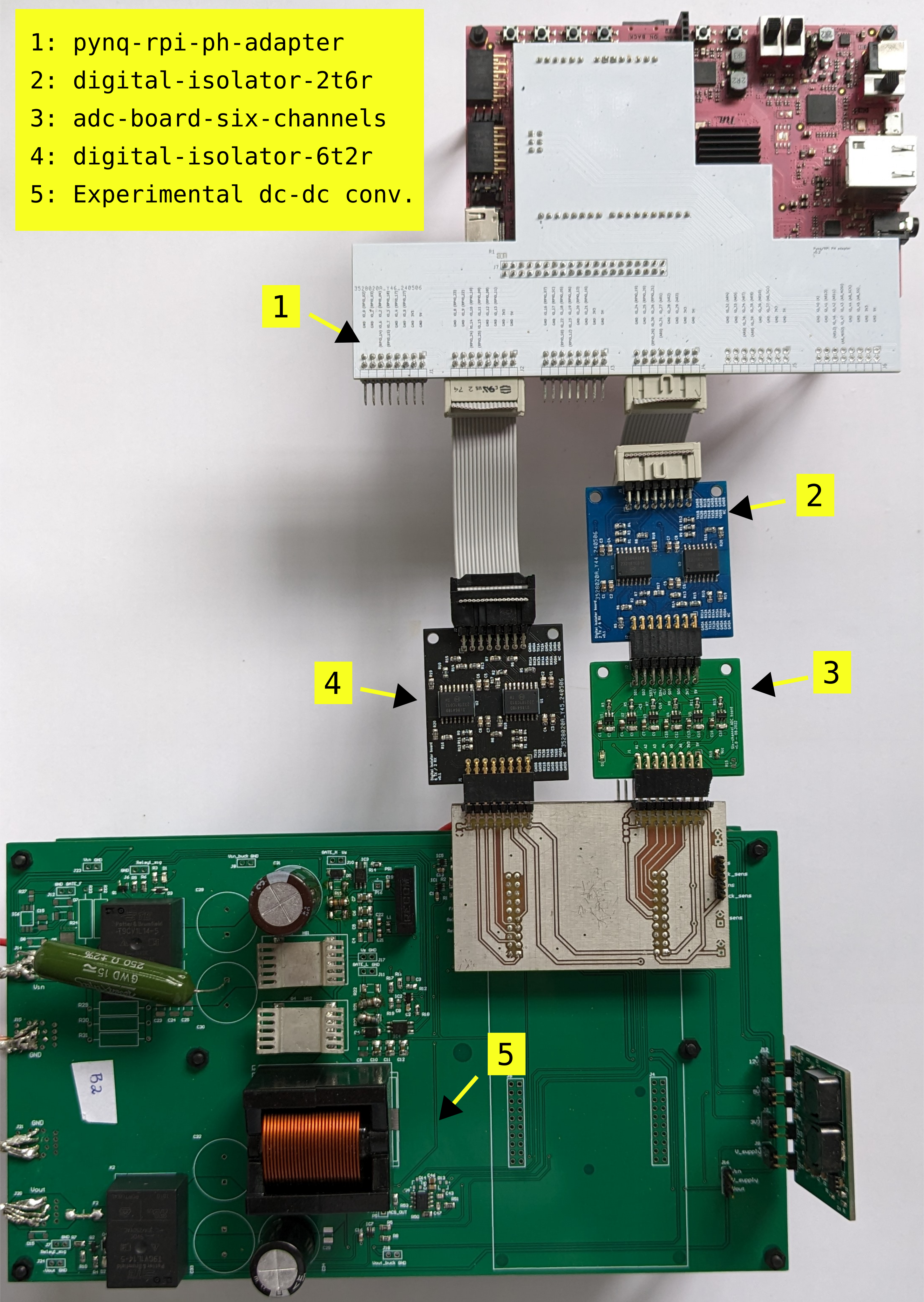
Fig. 43 Pynq adapter combined with compatible boards.
Warning
TODO: add constraints file
Fabrication files
To get the gerber files used to fabricate the ADC board, checkout commit 48243a0069cdf400ffa442e71829328903b15db7, and find the files under pynq-rpi-ph-adapter/gerber.